This page explains the behavior and settings of the Loop Count Branch step.
Loop Count Branch Behavior
Branches based on the current loop count of the scenario.
For example, you can perform initialization only on the first loop, or execute special actions every 5 loops.
Loop Count Branch Settings
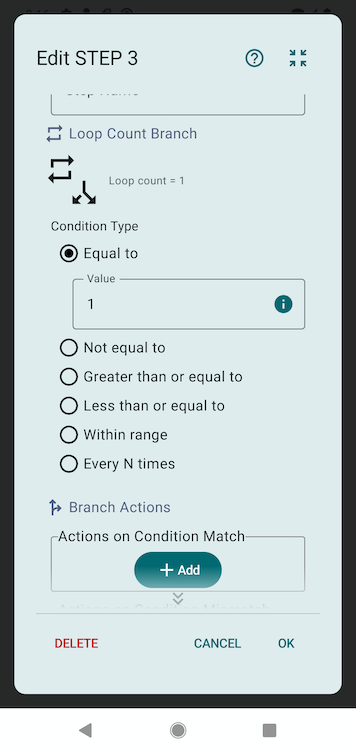
Condition Type
You can select from the following condition types:
- Equal to: Condition is met when the loop count equals the specified value
- Not equal to: Condition is met when the loop count does not equal the specified value
- Greater than or equal to: Condition is met when the loop count is greater than or equal to the specified value
- Less than or equal to: Condition is met when the loop count is less than or equal to the specified value
- Within range: Condition is met when the loop count is within the specified minimum and maximum values (inclusive)
- Every N times: Condition is met when the loop count is divisible by the specified value (e.g., specifying 5 means condition is met on loops 5, 10, 15...)
Actions on Success
A list of actions to execute when the condition is met.
Actions on Failure
A list of actions to execute when the condition is not met.
Usage Examples
Perform initialization only on the first loop
Set the condition type to "Equal to" and the value to 1. Configure the initialization actions in Actions on Success.
Execute special actions every 5 loops
Set the condition type to "Every N times" and the value to 5. Configure the special actions in Actions on Success. This will execute the actions on loops 5, 10, 15...
Skip actions after the 10th loop
Set the condition type to "Less than or equal to" and the value to 9. Configure the main actions in Actions on Success. After the 10th loop, the main actions will be skipped.